
Invite Co-Workers / Contacts
A walk through of how to get started in inviting your colleagues and contacts to your marketplace.
Enterprise Accounts
What is a connection and why so I need to do this?
To get the most out of your marketplace you need your employees, co-workers and most importantly customers to sign-up into your platform. This will then allow you to easily contact each other, keep them engaged with your company’s activities and will start building up a connection.
How do I invite co-workers to join our company’s network and contacts to connect and network with our company?
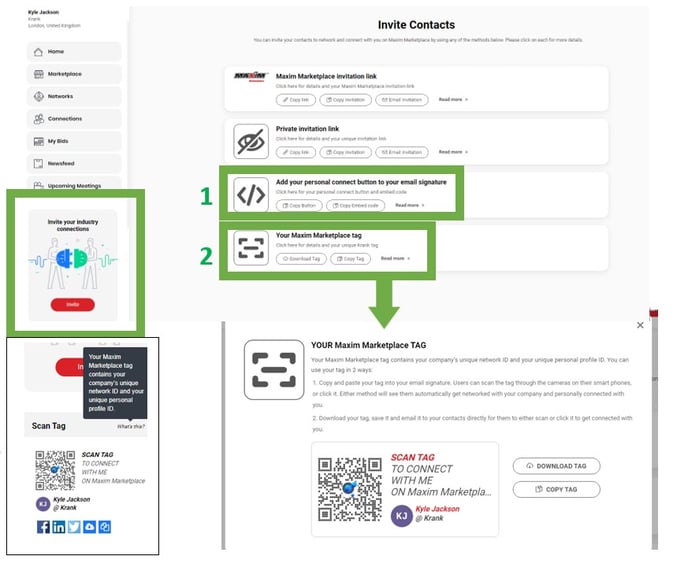
Go to your main navigation dashboard on the left-hand side of your screen, click on “Invite”, choose the invitation option you want, and use the options available for each to share the invite in the most convenient way. It is also possible to embed your personal connect button to your email signature (1) or even create a “Scan Tag” (2) that allows you to always provide visibility to your potential connections. You can also find your “Scan Tag” on your main navigation dashboard menu (3) which you can share this in various ways and include it in your email signature.
Your co-worker just needs to click the link and follow the instructions on screen to join your company’s network and get connected with you.Your contact needs to follow the same link and register on the marketplace (if they’re not already). Once they’ve registered, they’ll automatically be networked with your company and connected with you.
My co-worker has left our company, how can we delete them from our company network?
If an employee has left, please contact us at customersuccess@krank.com and our team will remove them from your company’s network.
If we delete a co-worker from our company network, what happens to their listings and other data they may have posted?
When you ask us to delete them from your company network, let us know what you want to do with the data. We can transfer the listings for you to another profile or delete them entirely.